
BudgetBliss is a free budget planner where you log every transaction yourself. Track savings accounts, credit cards, digital wallets and cash in one dashboard, set monthly category budgets, and save towards goals — without handing your bank credentials to anyone.
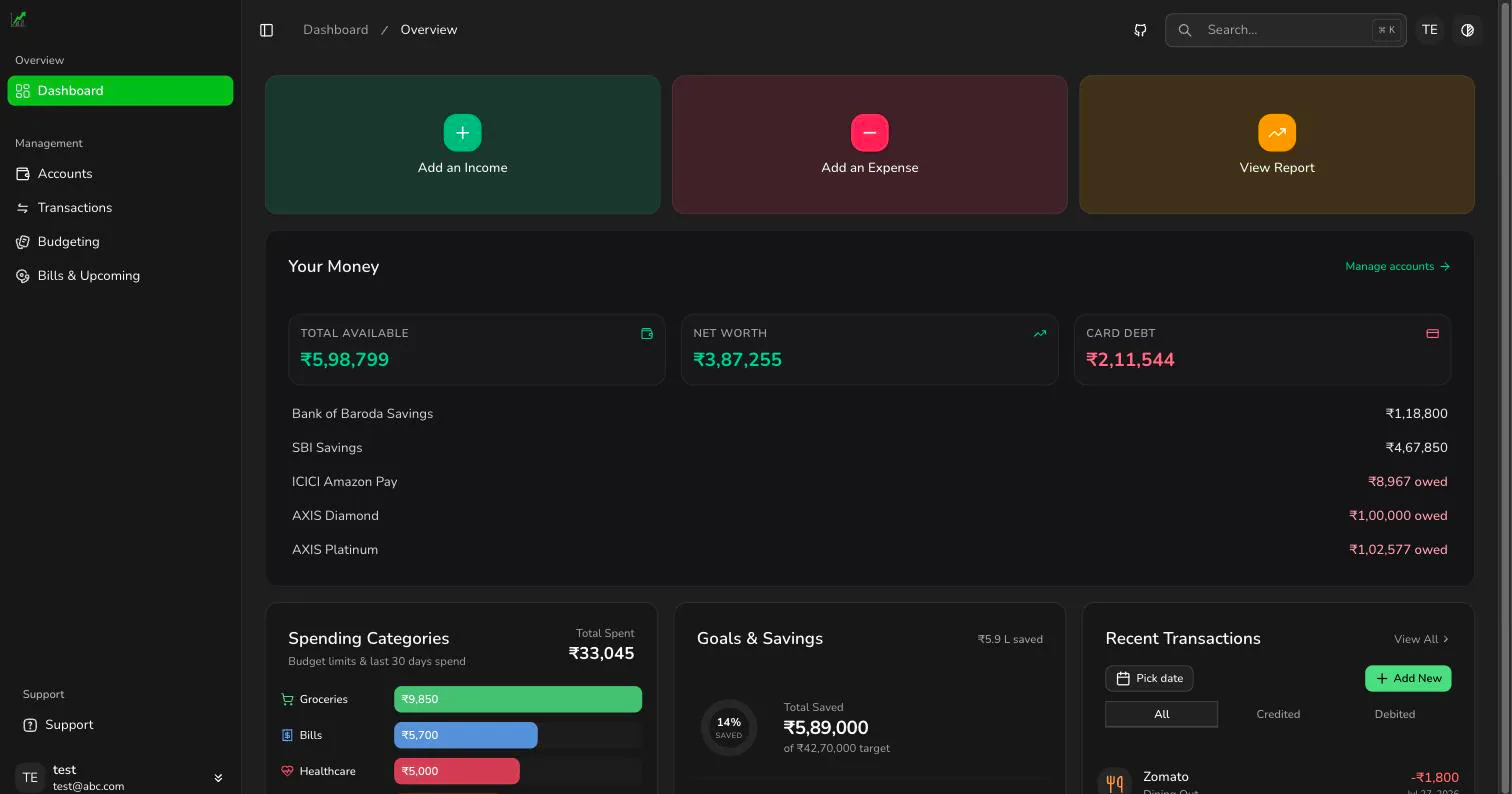
Five things, built and shipped. Accounts across savings, cards, wallets and cash; monthly category budgets; savings goals funded from real income; split expenses with credit-utilisation warnings; and bill, rent and EMI due dates you enter yourself.
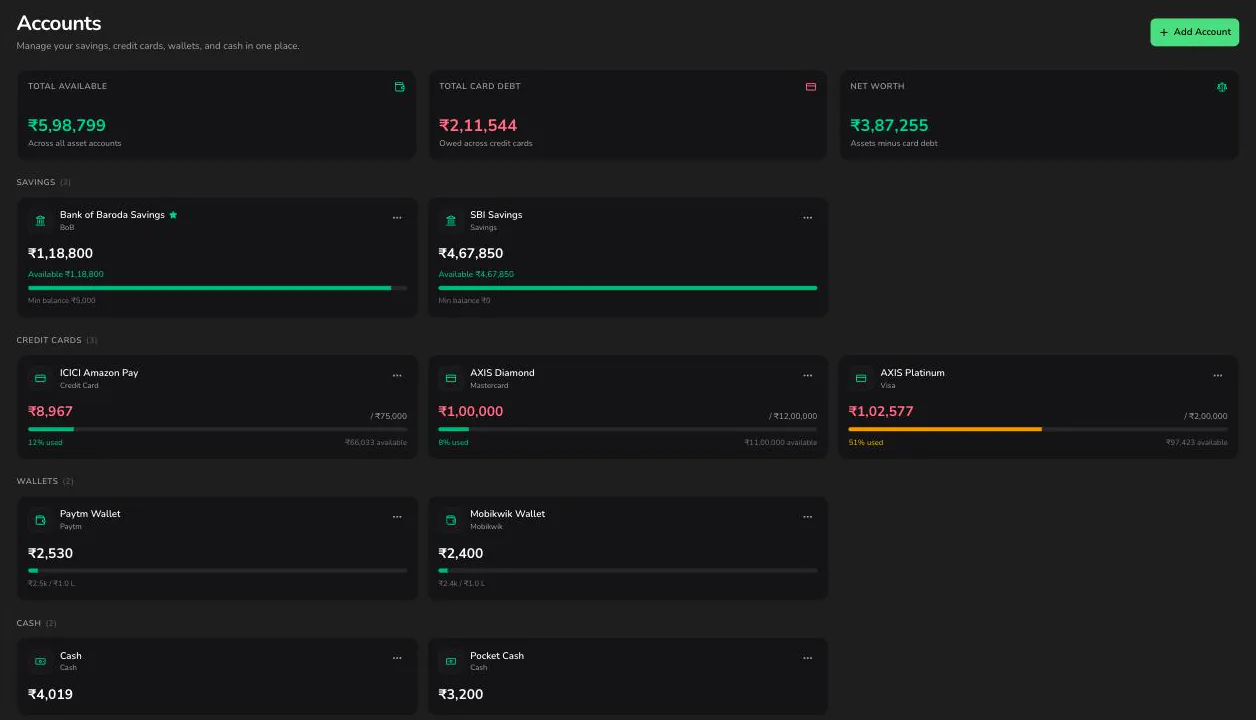
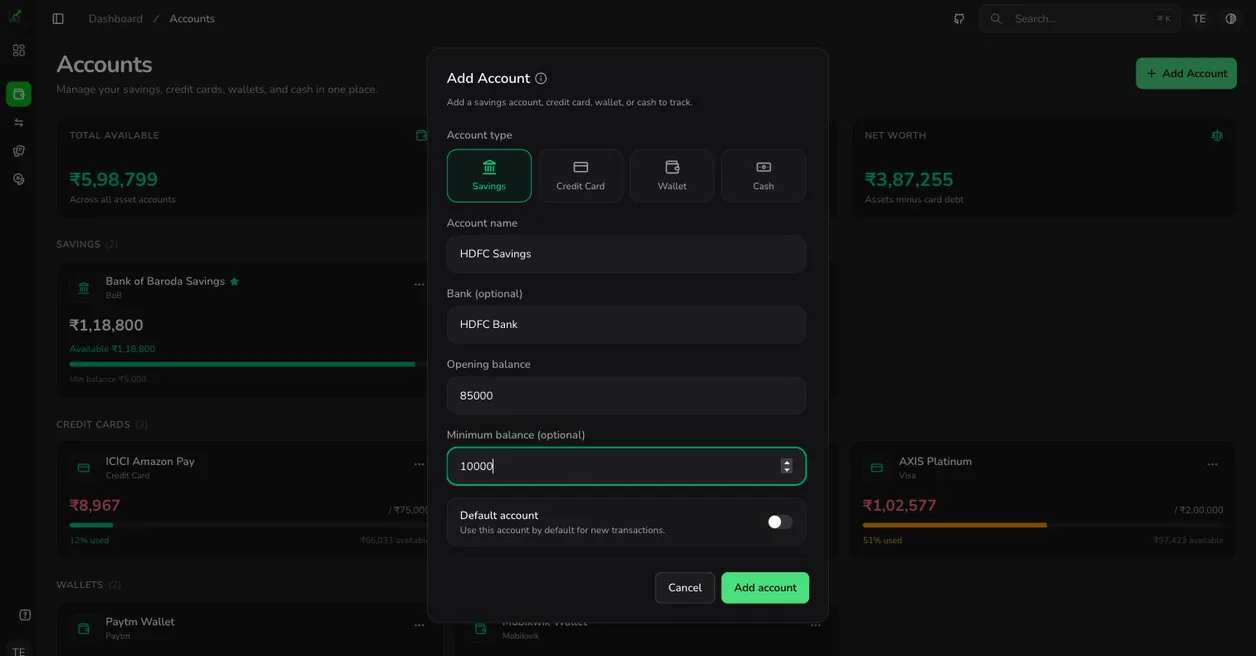
Every transaction is tied to a real money source. Track four account types — savings accounts with a minimum-balance threshold, credit cards with a limit, digital wallets with a cap, and plain cash. Balances are calculated from your transaction history, so correcting a mistake never leaves a stale number behind.
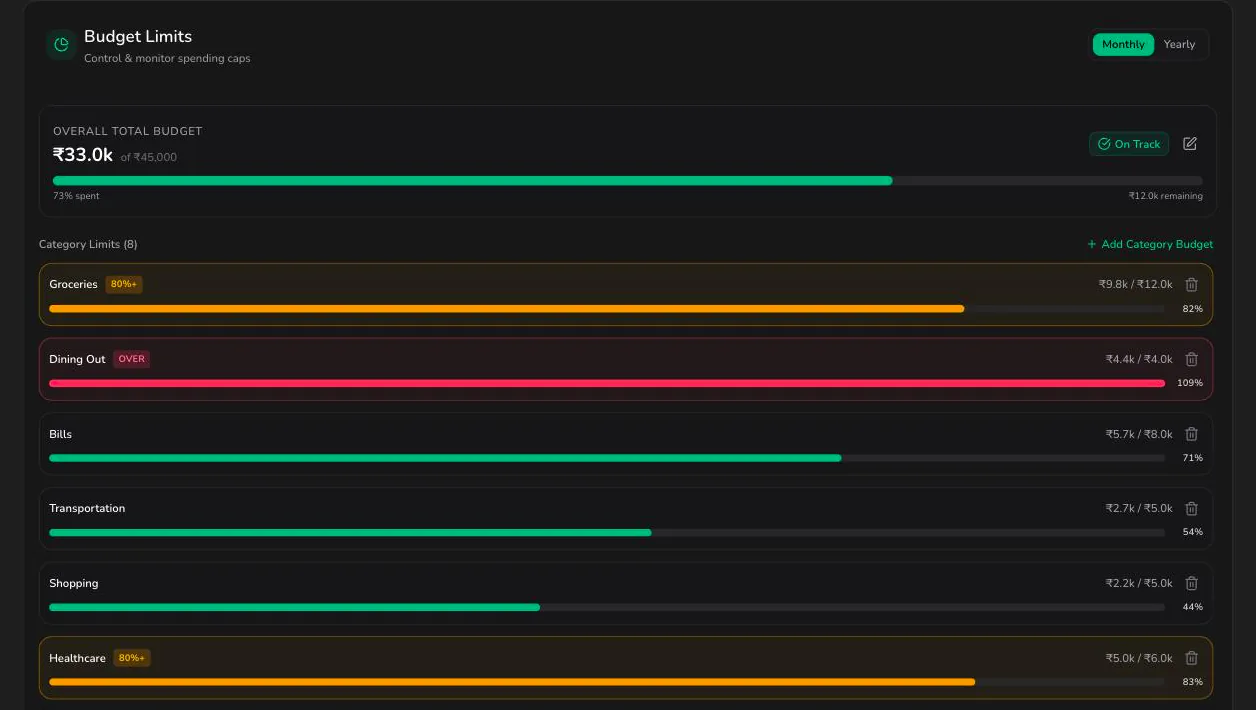
Set a spending limit per category for the month and watch the remaining balance fall as you log expenses. The spending-categories widget breaks down where the money actually went, so the gap between plan and reality is visible while you can still act on it.
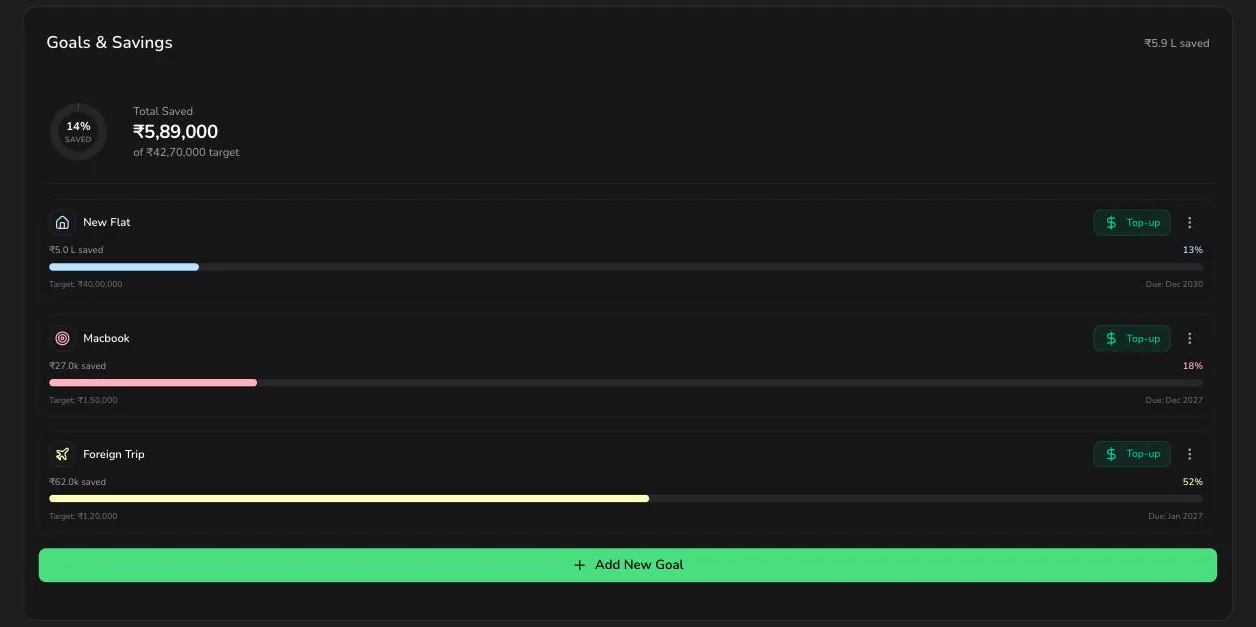
Create a goal, then contribute to it from real income rather than a wish-list number. Contributions are earmarked against the goal and reversed automatically if you edit or delete the underlying transaction, so progress always reflects money you genuinely have.
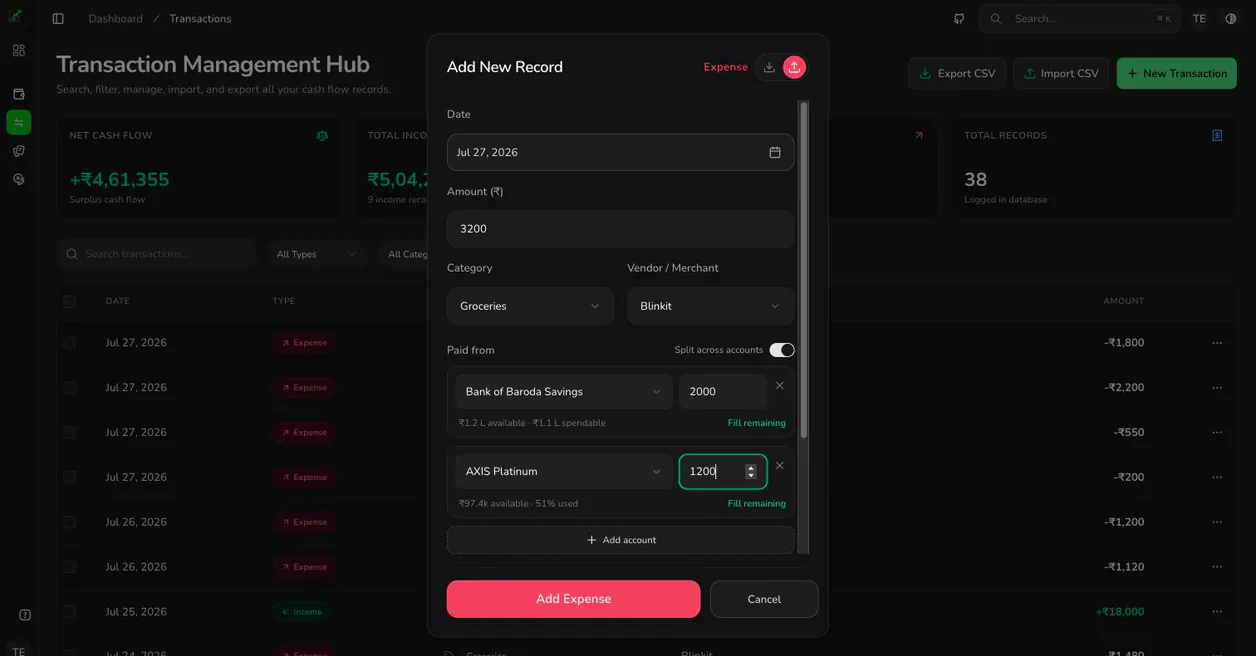
Divide one payment across several accounts — part on a card, the rest in cash — and the entries stay linked as a single expense. As you pick each account the form shows what is left on it, and a credit card already shows its utilisation, so you can see a card heading past 40 percent before you commit rather than after.
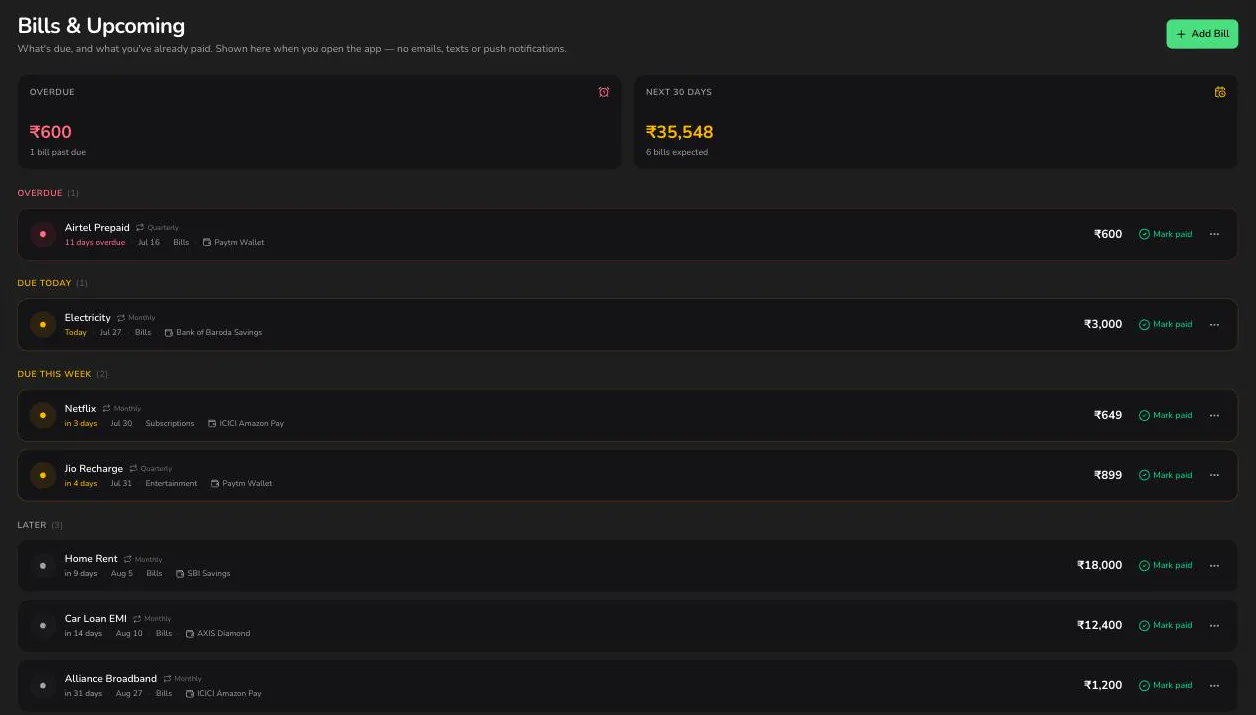
Enter a bill once with its amount and due date and it appears on the dashboard as the date approaches, sorted into overdue, due this week and later. Marking it paid logs a real transaction against the account you chose, then moves a recurring bill to its next cycle. BudgetBliss shows this when you open it — it sends no email, text or push notification.
Because the friction is the point. BudgetBliss does not link to your bank, and that is a design decision rather than a missing feature. Typing an amount forces a two-second review of a purchase you would otherwise never look at again — and that review, not the chart it produces, is where budgeting actually changes behaviour.
| Account type | Balance is | Guardrail |
|---|---|---|
| Savings account | Opening balance plus income, minus expenses | Warns when the balance falls below your minimum |
| Credit card | Amount owed — expenses minus repayments | Warns at 40% of your credit limit |
| Digital wallet | Loaded balance minus spending | Warns above the ₹2,00,000 wallet cap |
| Cash | Physical cash in hand | Warns on unusually large cash movements |
Balances are derived from your transactions rather than stored as a running total, so editing or deleting an old entry recalculates everything downstream instead of leaving a figure that no longer adds up.
Both the sign-in and sign-up screens have a Continue with demo account option that drops you straight into a working dashboard.
Three steps, and none of them involve a bank login: add your accounts, log what you spend, fund your goals.
Nothing, today. Everything that currently exists is on the free plan. The Pro and Family tiers below are planned, not yet purchasable — the prices show the intended direction.
Everything that currently exists, at no cost.
Available now
Deeper reporting and data export. Not yet available.
Billed as ₹1910/year
Planned
Shared household budgeting. Not yet available.
Billed as ₹4790/year
Planned
Straight answers about what BudgetBliss tracks, what it costs, and what it deliberately will not do.
Yes. The free plan covers unlimited manual income and expense entries, monthly category budgets, savings goals, spending-category tracking and reports. Paid tiers shown on the pricing page are planned but not yet available, so there is nothing to buy today.
No, and it is not planned. BudgetBliss is a deliberately manual tracker: you enter every account, card and transaction yourself. Nothing links to a bank, UPI handle or card network, so no third-party aggregator ever holds your credentials.
Manual entry is slower by design. Typing an amount forces a two-second review of a purchase you would otherwise never look at again, which is where most of the behaviour change in budgeting comes from. It also means the app needs no access to your bank credentials.
Four types: savings accounts (with a minimum-balance threshold), credit cards (with a credit limit and utilisation warnings), digital wallets (with a balance cap) and cash. Every transaction is tied to one of them, and balances are calculated from your transaction history rather than stored.
Yes. A split expense is recorded as several linked rows sharing one split group, so a single restaurant bill can be divided across categories or participants while still reconciling to one payment.
Card balances are tracked as amount owed, computed from expenses minus repayments. When utilisation reaches 40 percent of the credit limit, the dashboard raises a non-blocking warning so you can pay down before the figure is reported to a bureau.
It tracks them but it does not contact you. Enter a bill once with its amount, due date and how often it repeats, and it appears on the Bills page and your dashboard as the date approaches, grouped into overdue, due this week and later. BudgetBliss sends no email, SMS or push notification — you see what is due when you open the app. Marking a bill paid logs a real transaction and moves a recurring bill to its next cycle.
Yes. Both the sign-in and sign-up screens offer a "Continue with demo account" option that signs you straight into a shared demo workspace, so you can look around before creating your own account.
Data is scoped per user and never sold or shared. Only the last four digits of a card are ever collected — never the full number, CVV or PIN. Because the app stores personal financial information, a plain-language breach disclaimer is shown on the account form and on the privacy page rather than buried in terms.
Join thousands of people who've already transformed the way they budget. Get started in seconds — no credit card required.